Step 1: Download
Visit the Download page and install AirDroid Cast on the receiving computer or TV.
Step-by-step instructions for installation, connection, casting to TV, remote control, and resolving common issues.
Last updated:
Visit the Download page and select the installer for Windows, Mac, Android, iOS, or TV. Verify SHA-256 when hashes are published.
Install the receiver on your computer or TV and the sender app on your phone or tablet. Grant network access when prompted.
Free accounts sign in on one device. Premium yearly plans allow the same account on up to three devices simultaneously for remote mirroring features.
Visit the Download page and install AirDroid Cast on the receiving computer or TV.
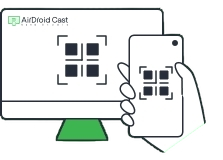
Open the app on your phone, scan the QR code on the receiver screen, or enter the 9-digit cast code to pair.

Accept the connection prompt and start mirroring. Audio shares automatically when supported on your devices.
Local casting works on the same WiFi or LAN. For devices on different networks, upgrade to premium and enable remote screen mirroring. Free accounts cannot use remote network mirroring.
USB connection is for casting mobile devices to computers. It can improve stability and enables Android screen-off casting.
Recent version 3.8.0.4 improves iOS USB screencast success rate. If USB fails, switch to wireless QR pairing as a fallback.
Supported brands include Sony, Hisense, TCL, Skyworth, and Philips smart TVs running Android TV.
Full touch control from Windows or Mac requires a premium upgrade. Free tier provides basic mirroring. Remote control needs Windows 10 build 1803 or newer on the PC receiver.
Heuristic engines may flag screen capture and input injection as suspicious. This is common for mirroring tools and remote support software.
Independent security scans have reported clean results for official AirDroid Cast builds. Avoid cracked or repackaged copies from unknown sources.
Disable AP isolation on your router, allow local network access in firewall settings, and ensure both devices use the 2.4 GHz or 5 GHz band consistently.
Move closer to the router, close background apps on the phone, reduce mirrored resolution if settings allow, or switch from wireless to USB for stability.
Confirm in-device sound sharing is enabled in cast settings. Restart both apps and reconnect the session.
Multi-screen mode supports up to five senders to one PC on the same network. Verify all devices share that LAN and use compatible app versions.
Upgrade to premium for remote screen mirroring across different internet connections. See FAQ for account limits.